Facebook chat is one of the coolest and most useful feature in FaceBook. However, if you have both the Friends and Online Business Clients on the same Facebook account, here is how to stay offline from one group and choose only selected contacts with whom you want to chat with.

Well i got to blog for this, as many of my friends were asking me how to stay invisible from particular friends and here is how to do it 🙂
Step 1 :
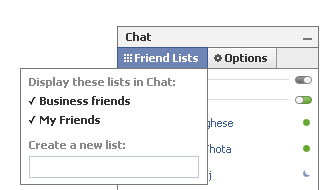
Go to Chat Box that is found at the lower right side of the page and then, click on Friends List. A small window will appear, where you will be able to create a new list.
For Eg., Now i have Created lists named “My Friends” and “Business Friends”
Step 2 :
Now, drag and drop those friends in the newly created list. Same way you can create a list like “Block List” and put those names whom u don’t wanna chat over there .
Step 3 :
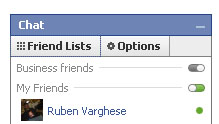
Then set your status to appear offline in any of your newly created lists using a small button on the right of the list name, it will be in Grey Colour if you set it to Offline, Green if set to Online. With this you will now appear Offline to your selected list. Try it now. 🙂

This is of course a very useful tips for me as I always want to block a few ‘annoying friends’ from my friends list.
Thanks for this very simple, easy to understand tutorial.
Useful FB Tricks…
Some of my Facebook Friends always Disturbs me while i work my daily online Task… So, No more because from now on, i will use this trick! lol! 😀
ha.. thats fine 🙂 btw welcome to my blog 🙂
It’s as good as blocking friends on facebook right? Nice article but I think everyone must be aware of this thing…
ya.. thank u for the comment dude.. we are trying to make people aware of it 🙂
I think this statement is just plain wrong. The chat application in bottom right hand side is not on the desktop but on the website, the link indicated isn’t called “appear offline” but “Go offline”, and you will not “appear offline” to all your facebook friends, you will “be offline” from facebook chat completely.
Thank you. It made things so clear and measured to do
yup.. its true.. but this topic is mainly chosen on SEO basis..
since every1 searches for the relevent words..
Welcome.. hope you play pranks with your friend as well. grt time ahead 🙂
This statement is very accurate. If I may bring a specific point to the table, facebook is worldwide and everyone needs to know that, second its easy for people to see this!
wow!! thanks a lot…this really has put me out of prblm!!
Cool 🙂
How do I know if this works??? Is there a way for me to verify??